Basic Computer Course in Dwarka
Basic Computer Course – Start Your Digital Journey
Learn MS Office (Word, Excel, PowerPoint), Internet, Email, Typing, Windows & More with 100% practical training. Perfect for beginners and students.
📍 Dwarka Mor | Short-Term + Certification
Course Overview
The Basic Computer Course at ICC Computer Centre, Dwarka Mor is designed for beginners who want to build a strong foundation in digital skills. This program covers essential topics like computer fundamentals, MS Office (Word, Excel, PowerPoint), internet usage, email, typing practice, and file management. Students also learn practical skills to operate computers confidently for study, job, or business needs.
At ICC Computer Centre, Dwarka Mor, we focus on hands-on training with expert guidance, making sure every student becomes comfortable with modern technology. This course is perfect for school/college students, job seekers, homemakers, and working professionals who want to improve their computer knowledge and boost career opportunities.
Course Content
1. Introduction to Computer
How to Turn On & Turn Off Computer
What is Computer? (Definition)
Importance of Computer in Daily Life
Characteristics of Computer (Speed, Accuracy, Automation)
History & Generations of Computers
Types of Computers (Desktop, Laptop, Tablet, Smartphone)
Basic Computer Components (CPU, Monitor, Keyboard, Mouse)
Input Devices (Scanner, Joystick, Webcam)
Output Devices (Printer, Projector, Speaker)
Storage Devices (HDD, SSD, Pen Drive, Cloud Storage)
2. Windows Operating System
Introduction to Windows Interface
Desktop, Icons & Taskbar
Start Menu & Navigation
File & Folder Management (Create, Rename, Delete)
Copy, Cut, Paste, Move Files
Control Panel & Settings
Personalization (Theme, Wallpaper, Screen Saver)
Installing & Uninstalling Software
Using Windows Accessories (Notepad, Paint, Calculator)
Common Windows Shortcuts
3. Typing & Keyboard Skills
Introduction to Keyboard Layout
• Home Row Keys & Finger Placement
• Typing with Both Hands
• Capital & Small Letters (Shift, Caps Lock)
• Special Characters (@, #, $, %)
• Speed & Accuracy Practice
• Typing Practice Software / Online Tools
• Numeric Keypad Practice
• Common Typing Mistakes & Correction
• Typing Shortcuts (Backspace, Delete, Ctrl+Z)
4. Internet & Email
• What is Internet & How it Works
• Web Browsers (Chrome, Edge, Firefox)
• Search Engines (Google, Bing)
• Downloading & Uploading Files
• Creating & Using Email Account (Gmail/Outlook)
• Sending & Receiving Emails
• Attaching Files & Links in Email
• Using Google Drive / OneDrive
• Online Forms & Applications
• Internet Safety & Cyber Security Basics
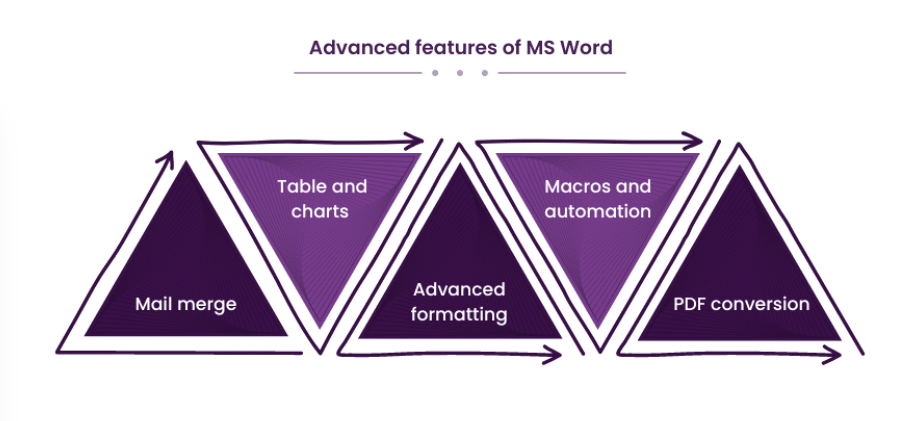
5. MS Word (Word Processing)
Introduction to MS Word Interface
Creating & Saving Documents
Formatting Text (Font, Size, Color, Style)
Paragraph Settings (Alignment, Line Spacing)
Bullets & Numbering
Insert (Table, Picture, Shapes, WordArt)
Page Setup (Margins, Orientation, Header/Footer)
Spelling & Grammar Check
Find, Replace & Shortcuts
Printing & Export as PDF
6. MS Excel (Spreadsheet)
Introduction to MS Excel Interface
Worksheets & Workbooks
Data Entry & Editing
Formatting Rows, Columns & Cells
Basic Formulas (SUM, AVERAGE, MAX, MIN)
Cell Referencing (Relative, Absolute)
Sorting & Filtering Data
Creating Charts & Graphs
Page Layout & Printing in Excel
Excel Shortcuts
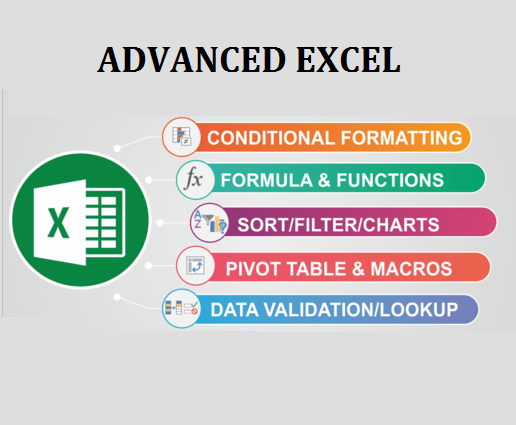
7. Advanced Excel
Conditional Formatting
Logical Functions (IF, AND, OR, NOT)
Lookup Functions (VLOOKUP, HLOOKUP, XLOOKUP)
Text Functions (LEFT, RIGHT, MID, LEN, TRIM, CONCATENATE)
Date & Time Functions (TODAY, NOW, DATEDIF)
Data Validation & Drop-Down Lists
Pivot Tables & Pivot Charts
What-If Analysis (Goal Seek, Scenario Manager)
Protecting Sheets & Workbooks
Data Cleaning & Analysis
8. MS PowerPoint (Presentation)
Introduction to PowerPoint Interface
Creating & Designing Slides
Slide Layouts & Templates
Insert (Image, Table, Chart, SmartArt)
Applying Themes & Backgrounds
Adding Animations
Slide Transitions
Inserting Audio & Video
Slide Show Presentation
Export as PDF or Video
9. Computer Security & Maintenance
What is Network? (LAN, WAN, MAN)
Wired vs Wireless Network
Modem, Router, Switch Basics
IP Address & Domain Concept
Wi-Fi Connection Setup
File Sharing in Network
Internet Speed Test & Bandwidth
Cloud Computing Basics
Online Collaboration Tools (Zoom, Meet)
Cyber Safety & Data Protection
10. Practical Projects & Assignments
Creating a Resume in MS Word
Preparing a Budget Sheet in MS Excel
Making Charts for Business Data
Using Advanced Excel Formulas in Project
Creating a Presentation on Any Topic
Making Animated Slides with Sound & Video
Sending Email with Attachments
Filling Online Form & Submitting Documents
Practice Typing Test (Speed & Accuracy)
Final Assessment Test & Certification
Why Choose ICC Computer Centre, Dwarka Mor?
Experienced & certified trainers
100% practical training on latest Basic Computer Course
Small batches for personal attention
Free study material & practice exercises
Flexible timings (Morning/Evening/Weekend)
Location advantage: Just 2 min walk from Dwarka Mor Metro Station
Affordable fees with installment options available
Regular assignments & doubt-clearing sessions
Regular tests & progress reports to track performance
Student-friendly environment – easy to learn, easy to understand
Who Can Join This Course?
School students – to improve academic & digital learning skills
College students – to prepare for higher studies & projects
Job seekers – to increase employability and career opportunities
Working professionals – to upgrade office & business computer skills
Homemakers – to learn internet, email, online payments & MS Office
Business owners – to manage accounts, data & communication digitally
Senior citizens – to confidently use computers, internet & smartphones
FAQs (Frequently Asked Questions)
Q1. What is the duration of the Basic Computer Course?
👉 The course duration is usually 3 to 6 months, depending on the batch and student’s learning speed.
Q2. What topics are covered in the course?
👉 The course includes Computer Fundamentals, MS Office (Word, Excel, PowerPoint), Internet, Email, Typing, File Handling, and Online Tools.
Q3. Do you provide study material?
👉 Yes, students get free study material, notes, and practice exercises for better learning.
Q4. Is the certificate valid for jobs?
👉 Yes, after successful completion, you will receive a recognized certificate which is useful for jobs, higher studies, and professional growth.