O' LEVEL
Master Tally with our expert-led Tally Prime Course in Dwarka Mor. Learn accounting, GST, payroll, and more with hands-on training and certification. Join now for career growth!
Course Overview
Looking to build a strong foundation in accounting and finance? Our Tally Prime Course in Dwarka Mor is designed to provide you with complete knowledge of Tally software, including practical applications in real-world business scenarios. Whether you’re a student, job seeker, or working professional, this course will equip you with the skills needed to manage business accounts effectively.
Tally Prime is one of the most widely used accounting software in India, making it an essential tool for anyone pursuing a career in accounting, taxation, or business management. Our course covers everything from the basics of Tally to advanced features like GST compliance, inventory management, payroll processing, TDS, and financial reporting.
At our institute in Dwarka Mor, we focus on practical training with real-time assignments and projects. Our certified trainers have years of industry experience and provide step-by-step guidance to help you understand complex accounting concepts with ease.
Course Content
1. Introduction to Tally Prime
What is Tally Prime?
Importance of Tally in Accounting
Difference between Tally ERP 9 & Tally Prime
Installation & Setup of Tally Prime
Tally Prime Interface Overview
Company Creation in Tally
Company Info Menu (Create, Alter, Shut)
Gateway of Tally Explanation
Basic Shortcut Keys of Tally Prime
Navigation in Tally
2. Company & Financial Year Setup
Creating a New Company
Selecting Financial Year & Books Beginning
Editing Company Details
Multiple Companies Management
Backup & Restore Company Data
Security Control (User & Password)
Setting GSTIN & Tax Information
Maintaining Accounts Only vs Accounts with Inventory
Enable/Disable Features (F11 Settings)
Shut & Delete Company
3. Accounting Fundamentals
Accounting Terminologies (Assets, Liabilities, Expenses, Income)
Golden Rules of Accounting
Double Entry System Concept
Voucher Types in Tally (Payment, Receipt, Contra, Journal)
Groups in Tally (Pre-defined & Custom)
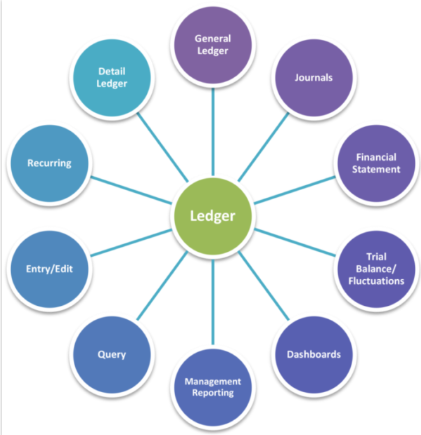
Ledger Creation & Management
Ledger Alteration & Deletion
Ledger Classification (Bank, Cash, Sundry Debtors, Sundry Creditors)
Trial Balance Basics
Balance Sheet Basics
4. Ledger & Voucher Management
Creating Ledgers under Proper Groups
Creating Bank Accounts in Tally
Payment Voucher Entry
Receipt Voucher Entry
Contra Voucher Entry (Cash Deposit/Withdraw)
Journal Voucher Entry
Sales Voucher Entry
Purchase Voucher Entry
Editing & Deleting Voucher Entries
Voucher Narration & Date Change
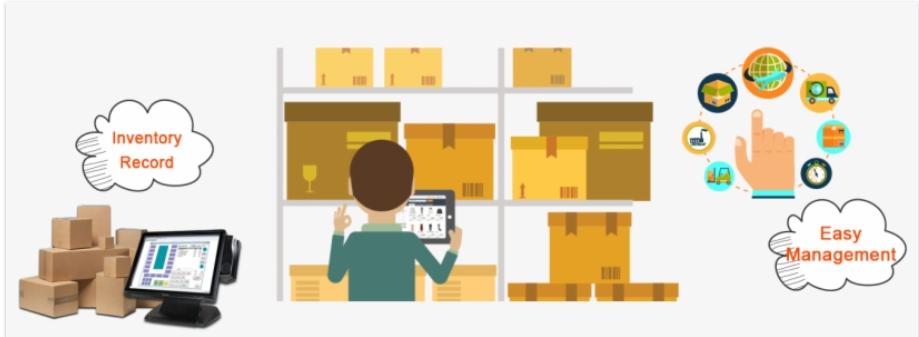
5. Inventory Management
Enabling Inventory Features
Creating Stock Groups
Creating Stock Categories
Creating Units of Measurement
Creating Stock Items
Recording Purchase with Inventory
Recording Sales with Inventory
Godown Creation & Tracking
Stock Summary Report
Batch-wise & Expiry Management
6. GST (Goods & Services Tax) in Tally Prime
Introduction to GST
Enabling GST in Tally Prime
Setting GST Details in Company
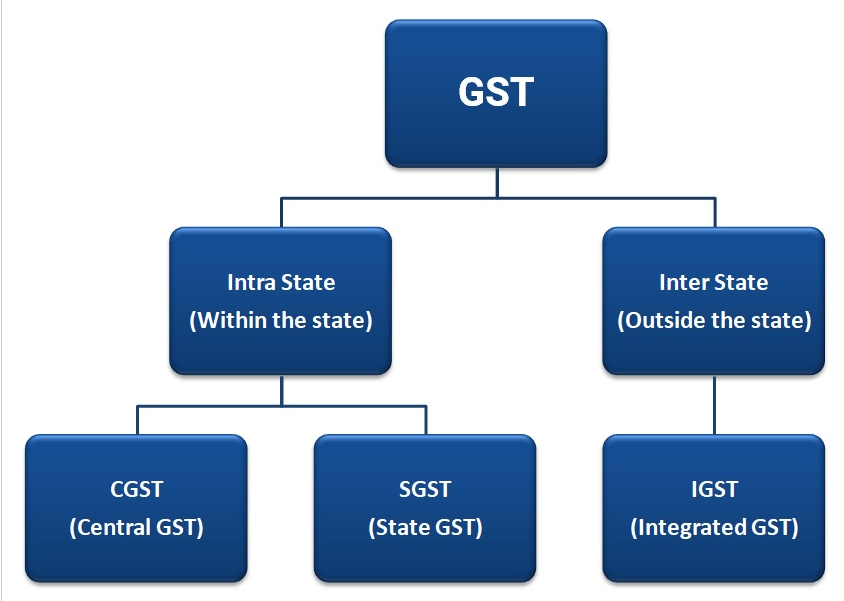
Creating GST Ledgers (CGST, SGST, IGST)
GST Rate Setup for Items
Recording GST Purchase Entries
Recording GST Sales Entries
GST Adjustment Entries
GST Returns in Tally (GSTR-1, GSTR-3B)
Exporting GST Data
7. Banking in Tally Prime
Bank Reconciliation Statement
Cheque Printing Setup
Deposit Slip & Payment Advice
Bank Ledger Creation
Electronic Fund Transfer (EFT/NEFT/RTGS)
Post-Dated Cheques in Tally
Bank Summary Report
Bank Overdraft Entry
Importing Bank Statement
Auto Reconciliation with Bank Statement
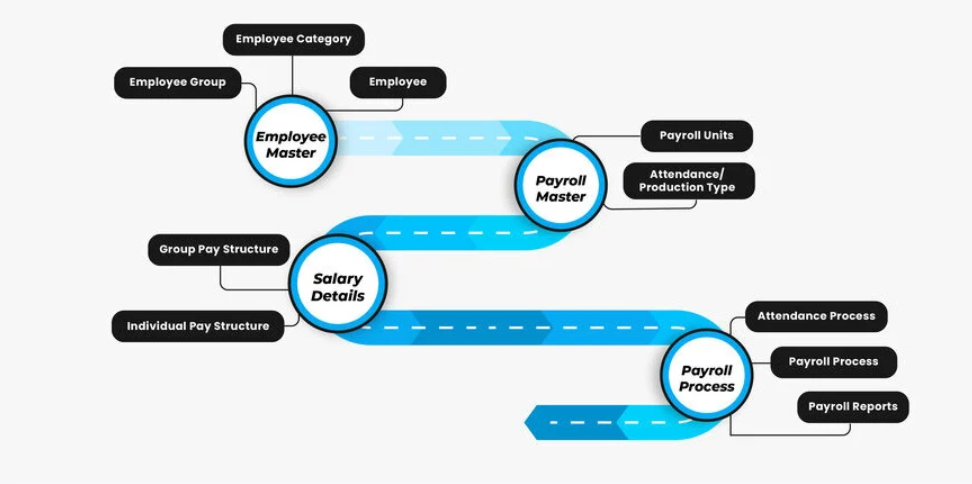
8. Payroll Management
Enabling Payroll in Tally
Employee Creation
Employee Group Creation
Salary Components (Earnings & Deductions)
Attendance & Production Type
Payroll Voucher Entry
Generating Salary Slips
PF & ESI Setup
Professional Tax in Tally
Payroll Reports
9. Reports & Analysis
Balance Sheet
Profit & Loss Account
Trial Balance
Day Book
Ledger Report
Cash/Bank Book
Outstanding Reports (Payables & Receivables)
Ratio Analysis
Inventory Reports
GST Reports
10. Advanced Features & Utilities
Lorem ipsum dolor sit amet, consectetur adipiscing elit. Ut elit tellus, luctus nec ullamcorper mattis, pulvinar dapibus leo.
Why Choose ICC Computer Centre, Dwarka Mor?
Experienced & certified trainers
100% practical training on latest Tally Prime version
Small batches for personal attention
Free study material & practice exercises
Flexible timings (Morning/Evening/Weekend)
Location advantage: Just 2 min walk from Dwarka Mor Metro Station
Who Can Join This Course?
- Students from commerce or non-commerce background
- Job seekers looking for accounting roles
- Small business owners who want to manage accounts themselves
- Professionals who want to upgrade skills
Course Duration & Mode of Learning
- Duration: 2 months (can be customized)
- Mode: Classroom training at Dwarka Mor + Online classes available
- Flexible batch timings (morning/evening/weekend)
Career Opportunities After the Course
- Accountant
- GST Executive
- Data Entry Operator
- Tally Operator
- Accounts Assistant in small and medium businesses
FAQs (Frequently Asked Questions)
1. What is the difference between Tally ERP 9 and Tally Prime?
What is Tally Prime?
Importance of Tally in Accounting
Difference between Tally ERP 9 & Tally Prime
Installation & Setup of Tally Prime
Tally Prime Interface Overview
Company Creation in Tally
Company Info Menu (Create, Alter, Shut)
Gateway of Tally Explanation
Basic Shortcut Keys of Tally Prime
Navigation in Tally
2. Can a beginner learn Tally Prime without accounting background?
Creating a New Company
Selecting Financial Year & Books Beginning
Editing Company Details
Multiple Companies Management
Backup & Restore Company Data
Security Control (User & Password)
Setting GSTIN & Tax Information
Maintaining Accounts Only vs Accounts with Inventory
Enable/Disable Features (F11 Settings)
Shut & Delete Company
3. Can a beginner learn Tally Prime without accounting background?
Accounting Terminologies (Assets, Liabilities, Expenses, Income)
Golden Rules of Accounting
Double Entry System Concept
Voucher Types in Tally (Payment, Receipt, Contra, Journal)
Groups in Tally (Pre-defined & Custom)
Ledger Creation & Management
Ledger Alteration & Deletion
Ledger Classification (Bank, Cash, Sundry Debtors, Sundry Creditors)
Trial Balance Basics
Balance Sheet Basics
4. Is this course available online?
Creating Ledgers under Proper Groups
Creating Bank Accounts in Tally
Payment Voucher Entry
Receipt Voucher Entry
Contra Voucher Entry (Cash Deposit/Withdraw)
Journal Voucher Entry
Sales Voucher Entry
Purchase Voucher Entry
Editing & Deleting Voucher Entries
Voucher Narration & Date Change